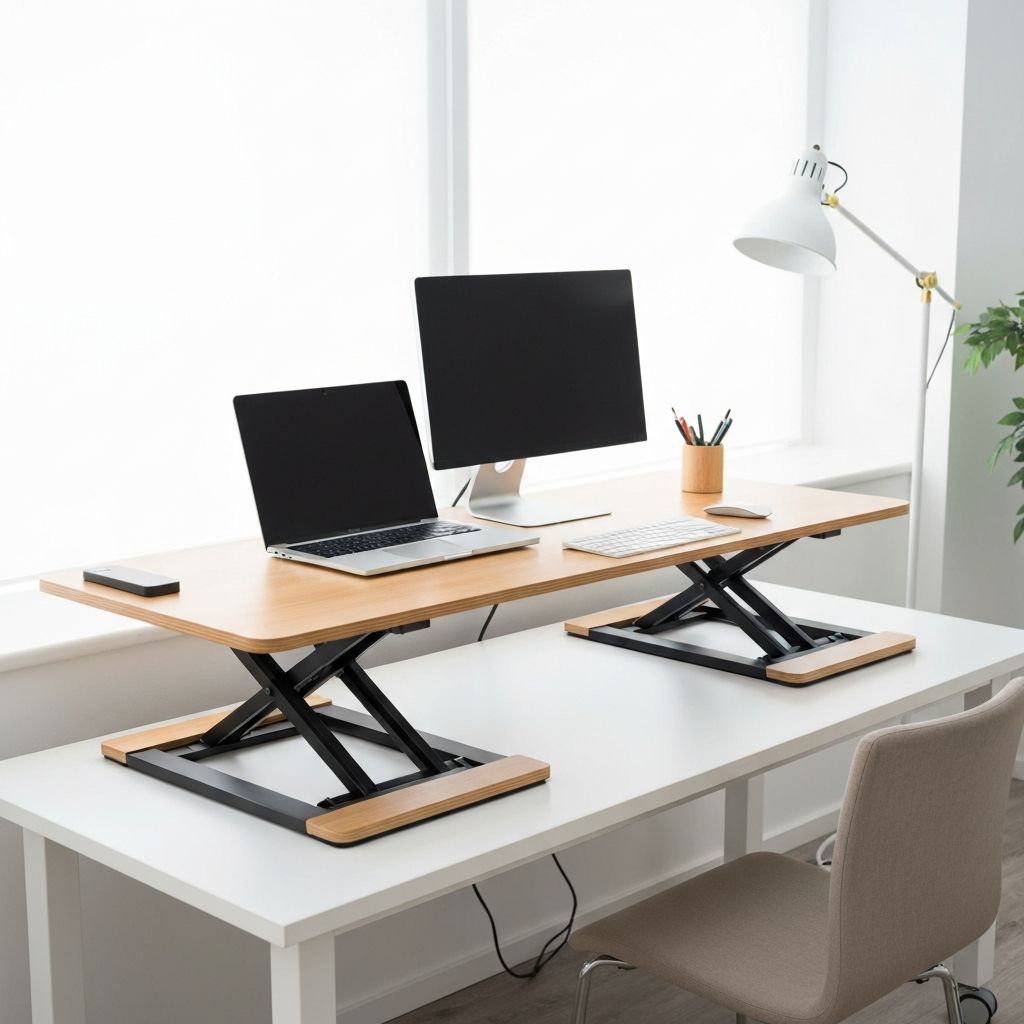
What Is A Riser Desk? Complete Guide to Standing Desk Converters
Discover what a riser desk is, how it works, health benefits of standing while working, types available, and tips for choosing the right desk converter.
Jennifer Moore
Author
The modern workplace has evolved significantly in response to growing awareness of sedentary lifestyle health risks. Among the most practical solutions for incorporating movement into desk-based work is the riser desk, also known as a standing desk converter or sit-stand desk riser. This comprehensive guide explores what riser desks are, how they work, their benefits, and how to choose the right one for your workspace and needs.
Understanding Riser Desks
A riser desk is a device that sits on top of an existing desk surface, allowing users to convert a standard sitting desk into a standing workstation. Unlike full standing desks that replace traditional furniture entirely, risers provide flexibility without requiring new desks or significant workspace modifications.
The fundamental concept is simple yet transformative. When you want to stand while working, you raise the riser to elevate your monitor, keyboard, and other work materials to standing height. When you prefer to sit, you lower the riser back down. This adjustability lets you alternate between positions throughout the workday, combining the benefits of both sitting and standing.
Riser desks emerged as a practical response to the expense and impracticality of full standing desks. Many people work in spaces where replacing existing furniture isn't feasible, whether due to rental restrictions, budget constraints, or the quality of existing desks. Risers provide standing desk benefits without these barriers.
How Riser Desks Work
Different riser desk designs use various mechanisms to achieve height adjustment, each with distinct advantages.
Spring-assisted risers use counterbalanced springs or gas cylinders to support the desktop weight. Squeezing handles or levers releases the mechanism, allowing smooth height adjustment. The spring assistance makes raising and lowering effortless even with heavy monitors and equipment on the surface. This mechanism type offers the smoothest, easiest adjustment experience.
Manual crank risers require turning a handle to raise or lower the surface. While more effort-intensive than spring-assisted models, crank mechanisms are often more affordable and equally reliable. Some users appreciate the deliberate action required, finding it encourages thoughtful decisions about position changes.
Electric risers use motors for height adjustment, typically controlled by buttons or programmable controls. Electric models often include memory settings to save favorite heights, returning to exact positions with button presses. While generally more expensive, electric risers offer the most convenient adjustment experience.
Fixed-height converters provide single preset standing heights without adjustment mechanisms. Users lift equipment on and off these platforms rather than adjusting the platform itself. While limited in flexibility, fixed converters are the most affordable option and work well for users who primarily want to stand.
Types of Riser Desks
Riser desks come in several configurations designed for different workspace needs and preferences.
Z-lift risers use a Z-shaped frame that folds flat for sitting and extends upward for standing. These designs typically offer smooth, stable height adjustment across a wide range. The folding mechanism allows the keyboard and monitor to move together while maintaining their relative positions.
Post-mounted risers use vertical posts or columns that the work surface moves along. These designs often provide greater height range and stability, particularly for heavier equipment. Some post-mounted risers include separate keyboard tray adjustments for optimized ergonomics at any height.
X-lift risers use an X-shaped scissor mechanism for height adjustment. Similar in function to Z-lift designs, X-lift risers fold compactly and provide stable, smooth adjustment. The choice between X and Z mechanisms often comes down to specific model features rather than mechanism superiority.
Floating arm risers mount to desk edges and use articulating arms to position monitors. These designs separate the monitor from the keyboard surface, allowing independent adjustment. While more complex, floating arm designs often provide the best ergonomic positioning options.
Desktop mounted risers attach permanently to desk surfaces, providing integrated standing capability. These solutions work well for dedicated workstations where removal isn't anticipated.
Health Benefits of Standing While Working
Research increasingly supports the health benefits of reducing sitting time and incorporating standing into workdays.
Reduced sedentary time addresses risks associated with prolonged sitting. Studies have linked extended sitting with increased risks of cardiovascular disease, diabetes, obesity, and certain cancers. Standing periodically throughout the day helps mitigate these risks.
Improved circulation occurs when standing, as muscles engage to maintain posture. This engagement promotes blood flow more effectively than sitting, potentially reducing swelling in legs and feet that many desk workers experience.
Increased calorie burn happens when standing compared to sitting, though the difference per hour is modest. Over time, regularly standing instead of sitting can contribute to weight management efforts alongside diet and exercise.
Reduced back pain affects many people who sit for extended periods. Standing changes spinal alignment and engages core muscles differently than sitting. Many users report decreased back and neck discomfort after incorporating standing into their routines.
Improved energy and focus are commonly reported by standing desk users. The postural engagement required for standing may increase alertness compared to the relaxed state that sitting encourages.
However, standing all day isn't healthy either. Prolonged standing can cause foot pain, leg fatigue, and other issues. The key benefit of riser desks is enabling alternation between positions, not replacing sitting entirely with standing.
Ergonomic Considerations
Proper ergonomics matter as much when standing as when sitting. Riser desks should allow proper positioning at both heights.
Monitor height should place the top of the screen at or slightly below eye level when looking straight ahead. Your eyes should naturally fall on the upper third of the screen without tilting your head. This positioning applies whether sitting or standing.
Keyboard height should allow your forearms to be approximately parallel to the floor with elbows at roughly ninety-degree angles. Wrists should remain neutral, not angled up or down. Some risers include separate keyboard tray adjustment to achieve this independently from monitor height.
Standing posture involves engaging core muscles, distributing weight evenly between feet, and avoiding locking knees. Standing mats or anti-fatigue mats provide cushioning that encourages subtle weight shifting, reducing strain on legs and feet.
Regular position changes matter more than any specific position. Alternating between sitting and standing throughout the day, ideally every thirty to sixty minutes, provides the best health benefits while preventing fatigue associated with either position maintained too long.
Choosing the Right Riser Desk
Selecting the best riser desk involves considering several factors related to your workspace, work style, and preferences.
Workspace dimensions limit your options. Measure your existing desk surface to determine what size riser will fit while leaving room for other items. Consider depth especially, as many risers extend forward when raised.
Weight capacity must accommodate your equipment. Total the weight of monitors, laptops, keyboards, and other items you'll place on the riser. Ensure your chosen model's capacity exceeds this total with comfortable margin.
Height range should allow proper ergonomic positioning at both sitting and standing positions. Consider your height, your desk height, and your chair height when evaluating whether a riser's range meets your needs.
Adjustment mechanism preference influences daily experience. If you'll adjust frequently, smooth, effortless mechanisms matter more. If adjustments are occasional, manual options may suffice despite requiring more effort.
Surface area needs depend on your equipment and work style. Dual monitor setups require more width than single monitors. Consider whether you need space for documents, notebooks, or other materials on the raised surface.
Stability when raised matters for comfortable typing and mouse use. Wobbly risers at standing height create frustrating work experiences. Reviews and specifications indicating stability should factor into decisions.
Budget ranges widely across riser desk options. Basic models start around one hundred dollars, while premium options with electric motors and advanced features can exceed five hundred dollars. Determine what features justify higher costs for your specific situation.
Setting Up Your Riser Desk
Proper setup maximizes riser desk benefits and ensures comfortable use.
Position the riser on your existing desk where you'll have adequate space when raised. Consider how extension toward you when standing affects your chair placement and access to other desk items.
Arrange equipment thoughtfully before adjusting to standing height. Ensure cables have sufficient length and aren't stressed when the riser is elevated. Cable management accessories designed for riser desks help keep cables organized across height changes.
Calibrate heights carefully before establishing regular use. Find your optimal sitting height with proper ergonomics, then do the same for standing height. Note these positions or use memory settings if available.
Add a standing mat beneath your standing area. Anti-fatigue mats make standing more comfortable and sustainable for longer periods. Quality mats provide cushioning and encourage subtle movement.
Developing Healthy Habits
Having a riser desk provides opportunity, but developing habits that use it effectively realizes the benefits.
Start gradually if you're new to standing while working. Standing for long periods immediately can cause fatigue and discomfort. Begin with fifteen to thirty minute standing periods, gradually increasing as your body adapts.
Use reminders to prompt position changes. Phone alarms, computer notifications, or dedicated apps can remind you to switch positions if you tend to lose track of time while focused on work.
Listen to your body's signals. Discomfort suggests either positioning issues that need adjustment or time to switch positions. Neither sitting nor standing should cause pain when properly set up.
Pair standing with appropriate tasks. Some people find standing better for focused, active tasks while sitting suits reading or contemplative work. Discover what works best for your work style.
Maintain overall physical activity alongside workstation adjustments. Riser desks complement but don't replace regular exercise and movement throughout the day.
Maintenance and Care
Proper maintenance keeps riser desks functioning smoothly for years.
Keep mechanisms clean and free of debris that might interfere with operation. Periodically wipe down adjustment mechanisms according to manufacturer guidance.
Check stability periodically, tightening any loosened screws or bolts. Slight loosening over time is normal with heavily used equipment.
Lubricate moving parts as recommended by manufacturers. Some mechanisms benefit from occasional lubrication to maintain smooth operation.
Avoid overloading beyond stated capacity. Exceeding weight limits stresses mechanisms and may cause damage or unstable operation.
Conclusion
Riser desks offer practical solutions for incorporating standing into desk-based work without replacing existing furniture. By understanding the types available, ergonomic considerations, and how to use them effectively, you can realize health benefits associated with reducing sedentary time. Whether you choose a basic manual riser or a feature-rich electric model, the key is developing habits that utilize the flexibility these devices provide. Regular alternation between sitting and standing, combined with proper positioning at each height, creates healthier, more comfortable workdays.
Frequently Asked Questions
What will I learn from this technology guide?
Discover what a riser desk is, how it works, health benefits of standing while working, types available, and tips for choosing the right desk converter.
More from Technology
Continue exploring our curated collection of articles

SEO Computers: Choosing the Right Machine and Ranking a Computer Business Online
SEO computers explained two ways: the hardware specs that genuinely speed up SEO work, and how computer businesses rank for the searches that bring customers.

modern seo
How modern SEO actually works in the AI search era, based on 18 months of traffic data across 40 sites, including what stopped working and what never changed.

How AI Is Reshaping SEO and Content Marketing
Discover how AI is reshaping SEO and content marketing, from generative search and intent modeling to automated content workflows, E-E-A-T, and measurable results.